 Share on Facebook
 Share on LinkedIn
 Share on Twitter

Your ERP shortlist may look perfectly reasonable on day one. The question worth asking is whether it still looks reasonable in year five, once your headcount has grown, your sites have multiplied, and your licence costs have kept pace with every hire.
When manufacturers evaluate ERP systems, they spend the majority of their time on functionality. Can the system handle our bill of materials? How does it manage production scheduling? What does the warehouse module look like? These are sensible questions, and a well-run product demonstration will answer most of them.
The question that rarely surfaces during the evaluation process concerns what happens to the cost of the system as the business grows. For a significant proportion of UK manufacturers, that omission proves an expensive one.
This article examines why the per-user licensing model, which remains standard across much of the ERP market, can work directly against the interests of a growing manufacturing business, and what a different approach to pricing looks like in practice. If you are currently evaluating ERP systems or planning to do so in the near future, it is worth understanding this before you sign anything.
How per-user ERP licensing actually works
Per-user licensing is simple in principle. You pay a fee for each person who accesses the system. Add more users, pay more. The logic appears fair: you are paying for what you use.
The difficulty for growing manufacturers is that ‘what you use’ expands in ways that are not always planned, budgeted for, or particularly predictable. Consider what triggers additional user licences in a typical manufacturing operation over three to five years.
You take on fifteen new production staff following a contract win. Your finance team expands from three people to six as the business grows more complex. You acquire a small competitor and bring their team onto your systems. You open a second facility and need site managers, logistics co-ordinators, and quality control staff to access the ERP. You bring in seasonal workers during peak periods. Your auditors, your 3PL partner, and your key suppliers all need read access to run their own processes cleanly.
Under a per-user model, every one of those scenarios triggers a fresh conversation with your ERP vendor about additional licence costs. The software budget that looked controlled at the point of signing begins to behave less like a fixed overhead and more like a tax on growth.
“Before we had Acumatica, when we had Oracle NetSuite, we had to limit the number of users to keep costs down.”
– Barbara Page, Controller, Quantum Group
That observation illustrates something important. When the cost of access is tied to headcount, businesses restrict access not to manage the software sensibly, but to manage the bill. The result is that people who could benefit from real-time operational data simply do not have it. Decisions are made on stale information. Workarounds accumulate. The system that was supposed to unify the business ends up being used by the smallest possible number of people who can make it function.
There is a version of this problem that tends to go unacknowledged: it affects the people at the top of the organisation just as much as those on the shop floor. In businesses where ERP licences are rationed, executives and senior managers often find their access has been quietly deprioritised in favour of finance and operations staff who need the system daily.
A CFO wanting to check project margins, or an operations director trying to understand a production shortfall, ends up asking someone else to pull a report rather than looking at the data directly. The system was bought to enable better decisions. The licensing model is preventing them.
What the numbers look like over time
It is worth making this concrete.
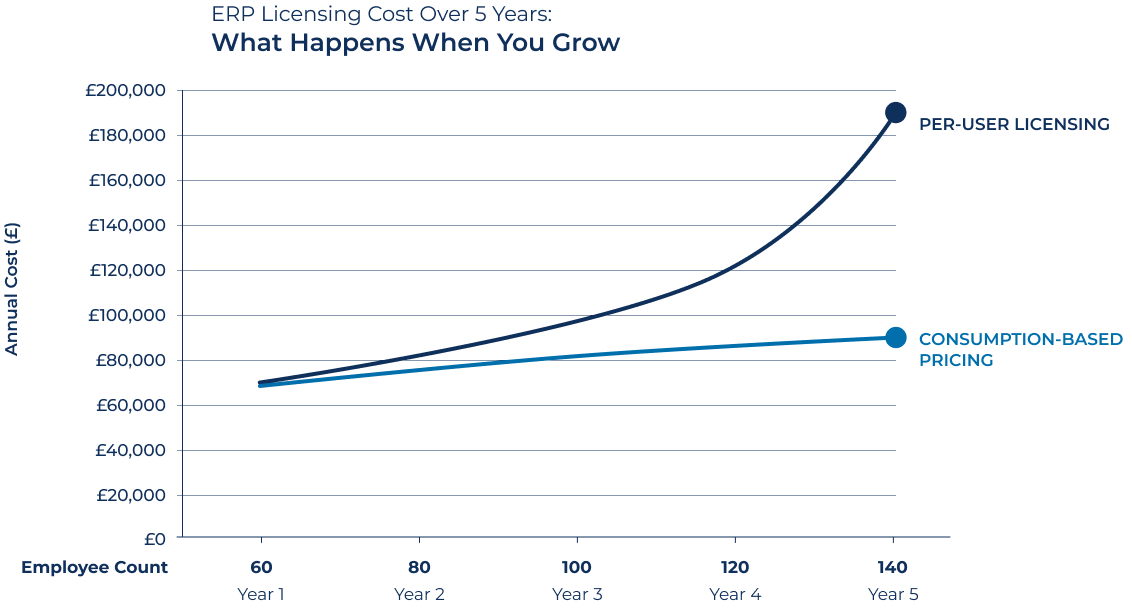
Take a UK manufacturer with 60 employees at the point of ERP selection. A typical per-user ERP licence for a business of this size might sit at around £80 to £120 per user per month, depending on the vendor and the modules required. At 60 users, that is somewhere between £57,600 and £86,400 per year in licence fees alone, before implementation, support, and customisation costs.
Now assume the business grows as planned. It reaches 100 employees within two years. Some of those employees need full ERP access; others need limited access to enter timesheets, check stock levels, or view production schedules. Under a per-user model, the vendor will have a view on which category each person falls into, and that categorisation will carry a price.
By year five, the same business has 140 staff across two sites, has completed one acquisition, and has a handful of external parties, including consultants and auditors, who require periodic access. The annual licence cost, which formed part of the total cost of ownership calculation presented at the point of selection, has increased substantially. Not because the software has improved dramatically, and not because the business made unusual demands of the vendor. Simply because it grew.
The growth that the ERP was supposed to support has become the primary driver of its cost.

A different model: how consumption-based licensing actually works
It is worth being precise about what consumption-based licensing means in practice, because describing it simply as ‘unlimited users’ understates the substance of the difference.
Acumatica provides two licensing options. One is named-user-based, which works broadly like the model described above. The other is Transaction Tier Consumption Licensing, and this is the model that fundamentally changes the economics of growth.
Under this model, pricing is tied to your Monthly Commercial Transaction Volume: defined as the single highest count from eight specific transaction types in any given month. For a manufacturer, those eight types are sales orders, shipments, AR invoices, customer payments, purchase orders, purchase receipts, AP bills, and AP payments. Acumatica uses whichever of those peaks is highest in a given month as the measure of the tier you are on.
The number of people accessing the system is not itself a billable variable. A business can give its entire workforce access to the ERP, including warehouse operatives, part-time employees, seasonal workers, and external collaborators such as auditors, suppliers, or logistics partners, without each additional person representing an additional line on the invoice.
How tiers work in practice: A manufacturer processing 3,000 sales orders in its busiest month would sit on an M1 tier. One processing 10,000 shipments a month would be at L2. The tier reflects commercial activity, not headcount. Tiers run from S1 (1,000 transactions per month) through to over one million at the upper end, as published in the Acumatica Licensing Guide (October 2025).
One important nuance: the unlimited-user benefit applies specifically to the consumption-based tiers on Select, Prime, and Enterprise editions. The entry-level Essentials tier, designed for businesses under 20 employees, uses named-user licensing and is capped at ten users. For a growing manufacturing business of any meaningful size, Essentials is unlikely to be the relevant product, but the distinction is worth noting.
“We wanted a licensing model that will grow with us and promote user adoption, so we can get the most value from it.”
– Chris Drake, Chief Operating Officer, Smartnumbers
The phrase ‘promote user adoption’ is worth pausing on. One of the most consistent findings in ERP implementation research is that poor user adoption is among the leading causes of implementations that fail to deliver their expected return on investment. A pricing model that actively restricts access does not help with that problem. A pricing model that removes the financial barrier to access does.
A further point worth noting for UK manufacturers specifically: Acumatica includes a dedicated UK Localisation across all editions, covering UK-specific accounting and compliance requirements. For businesses that have previously encountered US-origin ERP systems requiring considerable adaptation before they are fit for UK use, this is relevant context.
What price protection actually means in practice
The pricing model is not only a financial consideration. It is also an indication of how a vendor intends to treat you as a long-term customer.
Acumatica’s licensing terms include a published price cap: renewal prices for Acumatica subscriptions will not increase by more than 10% per year. That cap applies to the core subscription and remains in effect provided the customer does not reduce their edition or transaction tier.
Two things are worth acknowledging honestly about this. First, the cap does not extend to services, support, or third-party Marketplace products, so the full cost picture at renewal is not constrained to 10% across the board. Second, if the business grows to the point of needing to move to a higher transaction tier, the pricing at that point reflects the new tier rather than the capped renewal rate. For a fast-growing manufacturer, that transition is likely, and worth understanding before anything is signed.
Neither of these points makes the cap meaningless. In a market where many vendors reserve the right to adjust pricing at renewal with limited contractual constraint, a published, written commitment on the rate of increase is a genuinely different proposition. The leverage a vendor holds at renewal, when a business is deeply embedded in a system and migration is expensive, is considerable. A cap limits how much of that leverage can be exercised.
“We had heard about other vendors who get you in and then crank up the price later, but Acumatica doesn’t do that.”
– Chad Treadwell, Vice President of Operations, FSC Lighting
The question to put to every stand
We recently published a piece for the Lumenia ERP HEADtoHEAD™ blog setting out five questions UK manufacturers should ask before signing an ERP contract. The first of those questions is this: how does your pricing model work as our business grows?
That question is worth putting to every vendor you visit, whether at a formal evaluation event or in a direct sales process. Ask for specific figures. Ask what the licence costs in three years if you add 25 users, 50 users, 100 users. Ask what happens when you add a second legal entity, a third site, or a seasonal workforce.
If a vendor uses consumption-based pricing, ask what transaction tier your current volumes would fall into, and what the next tier up would cost. Ask for the renewal terms and price protection provisions in writing, and ask whether those protections extend to your full annual cost or only to the core subscription.
The answers will differ considerably across the market. Some vendors will give clear, written figures without hesitation. Others will redirect you to a pricing conversation that happens later in the process, after you have invested time in the evaluation and switching costs have begun to accumulate. The ease or difficulty of getting a plain answer is itself informative.
See this in practice at ERP HEADtoHEAD™
AcuPower will be representing Acumatica at the ERP HEADtoHEAD™ at The Eastside Rooms, Birmingham, on 24 and 25 March 2026. The event brings together 14 ERP vendors for structured, script-based demonstrations, which means you can compare what different pricing models actually look like side by side, without each conversation being managed separately by a sales team.
Bring the pricing question to every stand you visit. Come to Stand 11 and put it to us directly. We will walk you through exactly how Acumatica’s consumption-based licensing works, what transaction tier a business of your size and transaction volumes would typically fall into, and what the contractual commitments look like in writing.
Register your place at erpheadtohead.com. Use code AcuH2H for 20% off the delegate fee.
Register for ERP HEADtoHEAD™ — Use Code AcuH2H for 20% Off
Further reading: Our guest article for the Lumenia ERP HEADtoHEAD™ blog, ‘5 Questions UK Manufacturers Should Ask Before Signing an ERP Contract’, covers the full set of commercial questions worth raising at any ERP evaluation.
Comments (0)
No comments yet
Be the first to comment


 30
30