 Share on Facebook
 Share on LinkedIn
 Share on Twitter

AcuPower Blog | AcuPower
Est. reading time: 7 min
Most Financial Controllers know their AR and AP processes could be tighter. The question they rarely get to ask is: what would Finance actually look like if none of that manual work existed?
The real cost of manual AR and AP
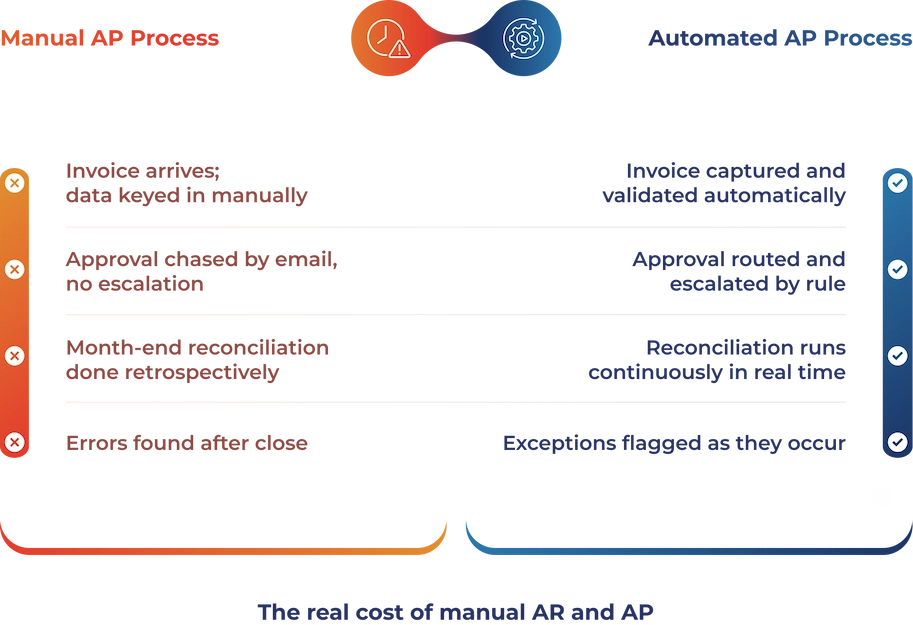
Every Finance team knows the cycle. Month-end approaches and the same sequence kicks off: chase outstanding invoices, reconcile the AR ledger, cross-reference the AP schedule against supplier statements, find the discrepancy that shouldn’t exist, and correct it before anyone upstairs asks for the numbers.
That cycle is normal. But normal does not mean it should be.
The manual effort built into AR and AP processes is one of the most persistent and most undercosted drains on mid-market Finance teams. It doesn’t appear as a line item. But it accumulates quietly: hours re-keying data, days added to the close cycle, cash flow decisions delayed because the picture isn’t clear until the work is done.
According to research from the Institute of Finance & Management, the average cost of processing a single invoice manually ranges from £9 to £15 in staff time, error handling, and rework. At 2,000 invoices a month, that is a budget conversation.
The problem is not that Finance teams are inefficient. The tools they are working with were not designed to remove that friction. They were designed to record it.
What AR/AP automation actually means
There is a version of “automation” that means little more than generating a PDF and emailing it. That is not what is being described here.
Genuine AR/AP automation does four things that manual processes cannot.
It removes the data re-entry layer entirely. Sales orders, purchase orders, receipts, and payments flow into the same ledger in real time. Nobody is copying a number from one screen into another.
It enforces rules consistently. Payment terms, approval thresholds, dunning schedules, and discount policies are defined once and applied every time, without relying on anyone to remember them.
It surfaces exceptions rather than burying them. The system flags anomalies automatically. Overdue balances, mismatched PO amounts, and duplicate invoices are surfaced rather than discovered accidentally at close.
AR and AP stop operating in silos. Your ERP works with live receivables and payables data instead of relying on exports and manual syncs. The Finance team works from a single source of truth. Cash flow forecasting, budget variance analysis, and period-end reporting all draw from the same accurate, current figures.
A tool that automates a task in isolation is still a workaround. A platform that removes the need for the workaround is something different.
Where automation makes the biggest difference

Not every AR and AP task carries the same cost. The impact of automation is sharpest in three areas.
Collections and dunning
Chasing overdue payments is one of the most time-consuming recurring tasks in Finance. A well-configured AR system sends reminders at defined intervals, escalates when thresholds are exceeded, and automatically logs every communication. The credit controller’s role shifts from chasing to managing exceptions, accounts that genuinely need a human conversation.
The practical effect is measurable. DSO typically falls when dunning is systematic rather than reactive. That is not a soft benefit. It is working capital.
Invoice processing and three-way matching
Three-way matching, confirming that the PO, goods receipt, and supplier invoice agree before payment is released, is the backbone of AP control. Done manually, it is laborious. Done automatically, it takes seconds.
Automated matching catches discrepancies before payment is made. It removes a category of error that would otherwise go unnoticed until a supplier calls or an auditor asks.
Period-end close
The close cycle is where accumulated manual effort becomes most visible. With automated AR and AP, data is clean in real time rather than cleaned retrospectively, which is the difference between a team that closes in two days and one that closes in ten.
The visibility problem that automation solves
There is a distinction worth drawing between having data and having visibility.
Many Finance teams have data, ledgers, exports, and reconciled accounts. But this can leave them feeling reactive and disconnected. Real-time visibility transforms their role, making them feel proactive and empowered to make informed decisions now, not just after the fact.
That kind of visibility changes how Finance operates. Cash flow forecasting becomes a live picture rather than a retrospective exercise. Decisions about supplier payment timing, early-settlement discounts, or credit terms can be made based on current data rather than estimates.
It also changes the role of the Financial Controller. A team spending its time on data maintenance is not spending that time on analysis. When maintenance is automated, the capacity for analysis expands, and the Finance function starts to look like the one most Controllers would prefer to run.
What this looks like inside Acumatica
Acumatica’s Financial Management module is built on the premise that AR and AP should operate as live, connected processes, rather than as reporting layers bolted on after the fact.
On the AR side:
Customer invoices generated directly from sales orders, with no re-entry required
Automated dunning schedules customisable by customer group, territory, or account balance
Cash receipts are applied automatically against outstanding invoices using configurable matching rules
AR ageing report is live and updated as transactions occur, not rebuilt at month-end
Bank feed integration makes reconciliation a confirmation step, not an exercise
On the AP side:
Supplier invoices captured via OCR and matched automatically to purchase orders and receipts
Approval workflows route invoices to the appropriate authoriser based on amount, category, or supplier, with automatic chasing if no response is received
Payment runs are generated against approved invoices, with early-settlement discounts applied where the cash position supports them
Supplier statement reconciliation automated, exceptions surfaced, matches confirmed
Because data flows in real time and reconciliations are ongoing, period-end close becomes a review of exceptions rather than a rebuild of the picture.
If you’d like a quick visual walkthrough of how AP works inside Acumatica, Acumatica’s Accounts Payable overview video shows the core workflow, from invoice capture to payment, in a few minutes.
The honest question to ask about your current system
Most mid-market Finance teams are not unaware that AR and AP could be improved. The question is usually one of two things: whether the current system can support it, and whether the disruption of changing is worth it.
Regarding the first question: some platforms have genuine automation capabilities that require significant configuration to unlock. Others have a ceiling, the architecture was not designed for real-time financial processing. If the month-end close still requires exports to Excel for reconciliation, that is a ceiling, not a configuration problem.
On the second: the cost of staying, in staff time, error rates, delayed close cycles, decisions made on stale data, is not zero. It is paid every month, invisibly.
The question worth asking is not “can we afford to automate?” It is “what is the cost of not automating, and have we ever actually added it up?”
A final thought
AR and AP automation is not a feature. It is a function. One that determines how much of your Finance team’s time goes into maintaining data versus using it.
The businesses that have made the shift describe the same outcome: fewer late nights at month-end, faster answers to leadership, a cleaner audit trail, and a Finance function that feels proactive rather than perpetually behind. Not because the team changed. Because the system stopped generating work the team had to undo.
If you would like to see what this looks like in Acumatica for your business, processes, and current system, we would be glad to walk you through it.
A conversation about your challenges, not a product demonstration.
Frequently asked questions
Q1. What is the difference between AR automation and AP automation?
AR automation manages incoming cash: invoicing, collections, and cash application. AP automation manages outgoing payments: supplier invoice capture, three-way matching, and payment runs. The two sides mirror each other, and the real benefit comes when both run inside the same ERP: cash forecasting becomes a live picture rather than a manual reconciliation between two separate processes.
Q2. What is three-way matching, and why does it matter?
Three-way matching is the process of confirming that a supplier invoice, the original purchase order, and the goods receipt note all agree before payment is released. It is the primary control against overpayment, duplicate invoices, and supplier billing errors. Done manually, it is one of the most time-consuming tasks in AP. Automated inside an ERP, it runs in seconds and flags exceptions rather than requiring review of every transaction.
Q3. How does AR/AP automation affect Days Sales Outstanding (DSO)?
DSO falls when collections are systematic rather than reactive. Automated dunning sends reminders at defined intervals, escalates overdue accounts without manual prompting, and logs every communication automatically. Finance teams that run manual collections typically see DSO drift as workload increases; teams running automated collections see it hold or improve because the process doesn’t depend on capacity.
Q4. Does AR/AP automation work as a bolt-on, or does it need to be inside the ERP?
Standalone tools can automate individual tasks, such as sending reminders and capturing invoices via OCR, but they create a reconciliation gap between the automation layer and the ledger. Every sync cycle is a potential discrepancy. When AR and AP automation run natively within the ERP, there is no gap: transactions post to the ledger in real time, and the period-end close reflects what actually happened rather than what was last imported.
Q5. What does AR/AP automation mean for the Finance team’s workload?
The tasks that automation removes are the high-volume, low-judgement ones: re-keying data, chasing overdue payments on a list, and matching invoices against purchase orders one by one. What remains and what grows is the analytical work: reviewing exceptions, interpreting the cash position, and supporting commercial decisions with accurate, real-time data. Most Finance teams describe the shift as moving from administration to analysis, not from employment to redundancy.
Q6. Can AR/AP automation help with Making Tax Digital (MTD) compliance?
MTD requires VAT-registered businesses to keep digital records and submit returns through compatible software. An ERP with native AR and AP automation maintains a continuous, complete digital audit trail, every invoice, every payment, every adjustment, that satisfies HMRC’s record-keeping requirements without additional effort at return time. Businesses still relying on manual processes or spreadsheet exports frequently find MTD compliance an additional burden; those running automated, ERP-native processes largely find it is already handled.
Comments (0)
No comments yet
Be the first to comment


 431
431