Share on Facebook
 Share on LinkedIn
 Share on Twitter

AcuPower Blog | AcuPower
8 min read
From 1 January 2027, every in-scope consignment of steel and aluminium needs its commodity code, origin, producing plant, net mass and embedded emissions on record. In Acumatica, most of that data already sits in the system.
From January, importing steel and aluminium into the UK comes with a new line of paperwork.
From 1 January 2027, the UK Carbon Border Adjustment Mechanism (CBAM) puts a carbon charge on imports of carbon-intensive goods. For each consignment, the importer needs five things: the commodity code, the country of origin, the plant that made the goods, the net mass and the embedded emissions. Those lines then go to HMRC.
There’s no practice run. The EU gave its importers over two years of reporting before any money changed hands. The UK charges from day one (Clifford Chance).
If you buy steel or aluminium from mills outside the UK, this lands on your desk in January.
What UK CBAM asks of an importer
UK CBAM covers five sectors: aluminium, cement, fertiliser, hydrogen, and iron and steel. Scope is set by commodity code, not by industry. So fasteners, steel structures and aluminium foil can be caught alongside plate, coil and bar.
The charge is simple to state:
CBAM liability = embedded emissions × CBAM rate - Carbon Price Relief
What are embedded emissions? They’re the greenhouse gases released when the goods were made, measured in tonnes of CO₂e equivalent (tCO₂e). At launch, UK CBAM counts direct emissions from the producing plant only.
The rate is set per sector each quarter, based on the UK Emissions Trading Scheme price. Carbon Price Relief lets you deduct a carbon price already paid in the country of production, with verified evidence.
A few other rules shape the work:
The threshold. You must register once your CBAM imports reach £50,000 in a rolling 12 months, or you expect them to within the next 30 days (HMRC). Below that, you still keep records from 1 January 2027.
Actual or default values. You can use verified emissions data from the producer, or HMRC’s default values per commodity code. A return filed on default values can’t be switched to actual data later (KPMG).
The dates. If you become liable during 2027, you have until 31 January 2028 to register. The first return and payment are due on 31 May 2028, with quarterly returns after that (Clifford Chance).
The hard part is the supplier, not the law
The rules are now mostly settled. The data isn’t.
You carry the liability, but the emissions figures sit with your overseas mills. In a recent Weightmans webinar poll, 66% of businesses named supplier carbon data as their biggest CBAM challenge (Weightmans).
There are good reasons for that. A producer needs a monitoring plan, a year of data and an accredited verifier. The verification report goes to the plant operator, not to you, so you depend on the supplier to pass it on. Some mills outside the UK may need two or three reporting cycles before their data is verification-grade (Paul Hastings).
To be fair, default values exist for exactly this reason. Most importers will start on them. But defaults tend to cost more than a good supplier’s real figures, so it pays to know which suppliers to chase first.
Most of the data is already in Acumatica
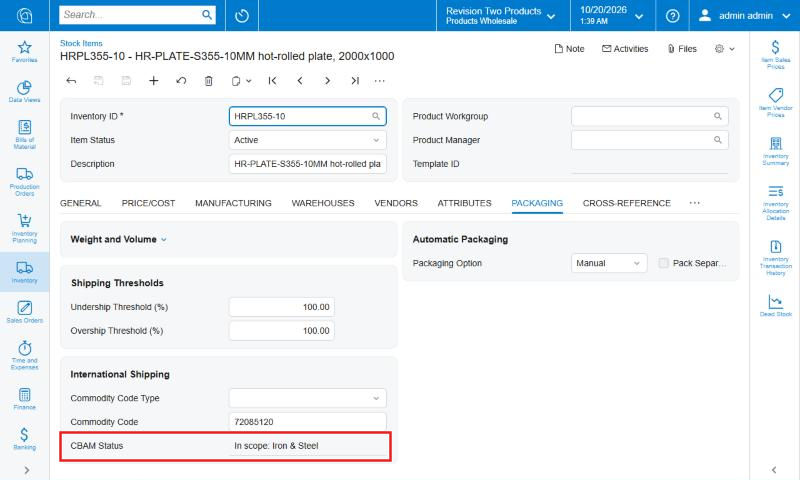
Here’s the good news. In Acumatica, most of what a CBAM return needs is already in the system. The commodity code and country of origin sit on the stock item. The supplier sits on the vendor record. The weight and date sit on the purchase receipt.
What’s missing is the link between them, plus the emissions figures. That’s the gap ACPR CBAM fills.
ACPR CBAM is a module for Acumatica 2026 R2, built by AcuPower’s development team under our CTO, Yuriy Zaletskyy, a 7-time Acumatica MVP. It doesn’t add duplicate fields. It reads the native Commodity Code and Country of Origin on each stock item and adds only what’s missing.
In practice, that means:
Five setup screens: CBAM Preferences, Commodity Codes, Installations, Supplier Emission Values and Default Values.
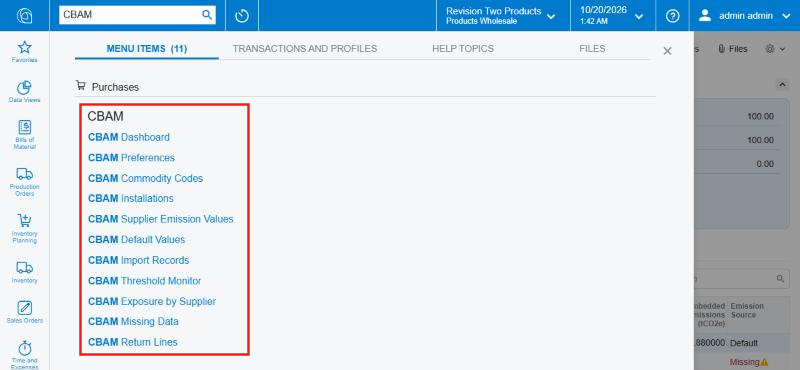
Five inquiries and a dashboard, all under Purchases > CBAM.
Additions to three standard screens: Stock Items, Vendors and Purchase Receipts.
It’s delivered as one customisation package, not a separate application. Your team keeps working in the screens it already knows.
What happens when the steel arrives
Your buyers enter purchase receipts exactly as before. As each line is saved, the module fills eight CBAM columns from the item and the vendor: commodity code, country of origin, installation, net weight, a flag for goods made from UK-origin material, emissions intensity, embedded emissions and the emission source.
The module only counts real imports. A receipt is in scope when the vendor is outside the UK, the commodity code is on the CBAM list and the receipt date is on or after the effective date. Buy from a UK stockholder and nothing is recorded, wherever the steel was made. Scrap headings can be excluded with a stated reason.
How the emissions figure is chosen. The module looks for a value in a set order and records which one it used:
Actual. The supplier’s reported value for that plant and commodity, valid on the receipt date.
Default. If there’s no actual value, the default for the country of origin, or failing that, the default for any origin.
Missing. No origin, no weight or no value at all. The line gets a warning and goes on a follow-up list.
You choose what happens to missing data on release. In Warn mode, the line is recorded and flagged. In Block mode, the release stops and the system lists every line that needs data:
“The receipt cannot be released because CBAM data is missing. Line 1 (UB203X133): emission value.”
When the receipt is released, the CBAM record is written in the same transaction. The stock movement and the CBAM ledger can’t drift apart.
Returns net themselves off. Take a sample receipt of 60 hot-rolled plates at 157 kg each: 9,420 kg from a mill in Türkiye. If 10 plates go back, the return writes a negative record of 1,570 kg against the original receipt, in the original quarter. The return line nets to 7,850 kg, and no history is overwritten.
Keeping track of the threshold, exposure and missing data
Once records are flowing, the question changes from “what did we import?” to “where do we stand?”. The module answers that on three screens.
Threshold Monitor. This compares the value of CBAM goods received in a rolling window with the registration threshold, and shows the percentage used and a status. Returns reduce the running total. It’s a running check rather than your formal registration test, because HMRC’s test is based on customs value and also looks 30 days ahead.
Exposure by Supplier. This shows weight, value and embedded emissions per supplier and sector for any period. It splits emissions from actual data and from default values, so the suppliers worth asking for real figures stand out.
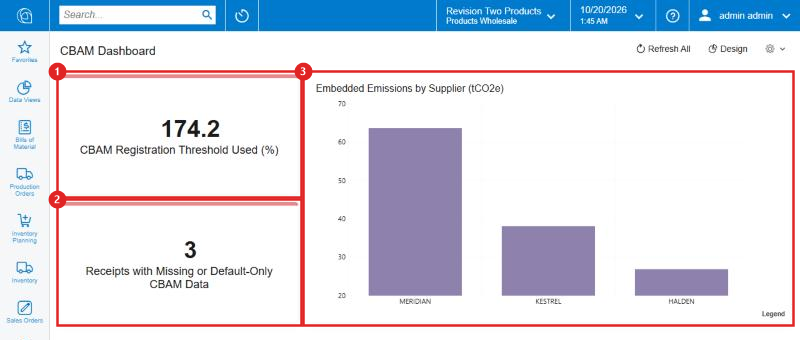
CBAM Dashboard. This puts three figures on one page: how much of the threshold you’ve used, receipts with missing or default-only data, and embedded emissions by supplier.
From a gap to a supplier request
Two features handle the chasing.
The Missing Data inquiry lists every receipt line that relies on default values or has data missing. It includes receipts not yet released, so gaps can be closed before goods are booked in. It also shows what to ask for and the supplier’s contact details.
From the vendor record, one action, Request CBAM Emissions Data, prepares an email to the supplier’s main contact. It lists every line on default values or with missing data, and what’s needed for each. The email is saved as a draft in the vendor’s Activities. Your buyer reviews it and sends it. The module never sends anything on its own.
When the supplier replies, you enter or upload the figures from a CSV file and attach the verification report to the producing plant. Each value carries a valid-from date, so next year’s figures can be loaded in advance without touching receipts already in progress.
From ledger to return lines
Every record written on release appears in CBAM Import Records, a read-only ledger with Acumatica’s standard filters, grouping and Excel export. Each row links back to its receipt, which makes the audit trail easy to follow.
Before a deadline, CBAM Return Lines gives one row per consignment line for the period you choose. Each row holds the commodity code to eight digits, net mass, country of origin, the emissions intensity or default value level, any Carbon Price Relief, and the quarter and date of import. Returns are already netted in.
Preparing the return then takes four steps:
Set the import dates to the reporting period.
Check that Missing Data shows nothing outstanding, or accept the lines that stay on default values.
Export the grid to Excel.
Key the lines into HMRC’s online CBAM service.
The data isn’t locked inside the screens, either. A REST endpoint and OData feeds for all five inquiries mean Excel, Power BI and AI assistants that already connect to Acumatica can read the CBAM data without a custom connector.
The figures are checked, too. The module comes with 48 automated checks that compare its results with hand calculations, covering actual, default and missing data, excluded scrap, a UK supplier, a partial return, Block mode and every inquiry. All 48 passed on Acumatica 2026 R2.
What the module does not do
It’s worth being clear about the edges, because CBAM is a tax and the details matter.
It doesn’t file your return. The module produces the return lines. Your team keys them into HMRC’s online service. There’s no connection to HMRC.
It doesn’t make you compliant on its own. Responsibility for the return stays with you as the importer. Your customs or tax adviser should confirm how the rules apply to your business.
It needs HMRC’s default values loaded. The module ships with demonstration values. HMRC published its real default values on 16 October 2026 (KPMG), and they’re imported before go-live.
It starts with iron, steel and aluminium. The commodity code list is configurable, but the standard setup covers those three. Cement, fertiliser and hydrogen need their codes added.
It doesn’t rewrite history. When new emission values arrive, records already written keep the values used at release.
It doesn’t price the charge. The module records emissions and Carbon Price Relief. The charge in pounds depends on HMRC’s quarterly rate, which sits outside the module.
What to do before January
Whatever system you use, these five steps will make the first quarter easier.
Check your item data. Every stock item you import needs a commodity code and a country of origin. Gaps here become gaps in every CBAM record.
List the plants behind your suppliers. CBAM data is tied to the producing plant, not just the trading company you buy from.
Start the supplier conversation now. Ask your main mills what verified emissions data they can provide, and when. Put the duty to share verification reports into supply contracts where you can.
Decide how strict to be at receipt. Choose whether missing data should flag a line or stop the release. Block gives cleaner data, while Warn keeps goods moving.
Review quotes and contracts. CBAM adds a cost that changes every quarter. Long-running contracts and fixed quotes priced today may not cover it (Pinsent Masons).
Record it when the steel arrives
UK CBAM turns supplier carbon data into a tax line. The importers who cope best will be the ones who capture that data at the point of receipt, not at the end of the quarter from a pile of spreadsheets.
If you’d like to see what that looks like for your own suppliers and products, talk to Brendan Mead, our Sales Director. He’ll take you through ACPR CBAM on our demonstration system, from one receipt to its return line, and talk through how it would fit the way your business buys and receives.
Comments (0)
No comments yet
Be the first to comment


 144