Share on Facebook
 Share on LinkedIn
 Share on Twitter

AcuPower Blog | AcuPower
10 min read
Acumatica 2026 R2 changes how a services firm tracks an engagement, from the first hour logged to the final invoice. Here’s what each change means for your engagement leads, your finance team and your practice heads.
In this article:
From the first hour to the final invoice
Parent and child projects for big engagements
Scope changes and change requests
Billing, revenue and forecasts
Outside specialists and the Vendor Portal
Asking your numbers: the AI Assistant
What it means for your engagement leads, finance team and practice heads
From the first hour to the final invoice
A services firm sells time and scope. Whether an engagement makes money depends on small things. Did the hours go to the right project? Did the cost land in the right branch? Was the scope change priced before the work started? When those answers sit in different places, you find the gap at invoice time.
Acumatica 2026 R2 moves more of that into the project record. It adds parent and child projects, time and expense costs that follow the project’s branch, tighter change requests, wider billing reports and monthly cost forecasts. This article follows one engagement from the first hour logged to the final invoice, and says what each change means for the people who use it.
Several of these project features also suit contractors. We cover that side in our Construction article. And 2026 R2 is a wider release. For the AI Assistant, MCP and the Modern UI, read our overview of everything new in Acumatica 2026 R2.

Parent and child projects for big engagements
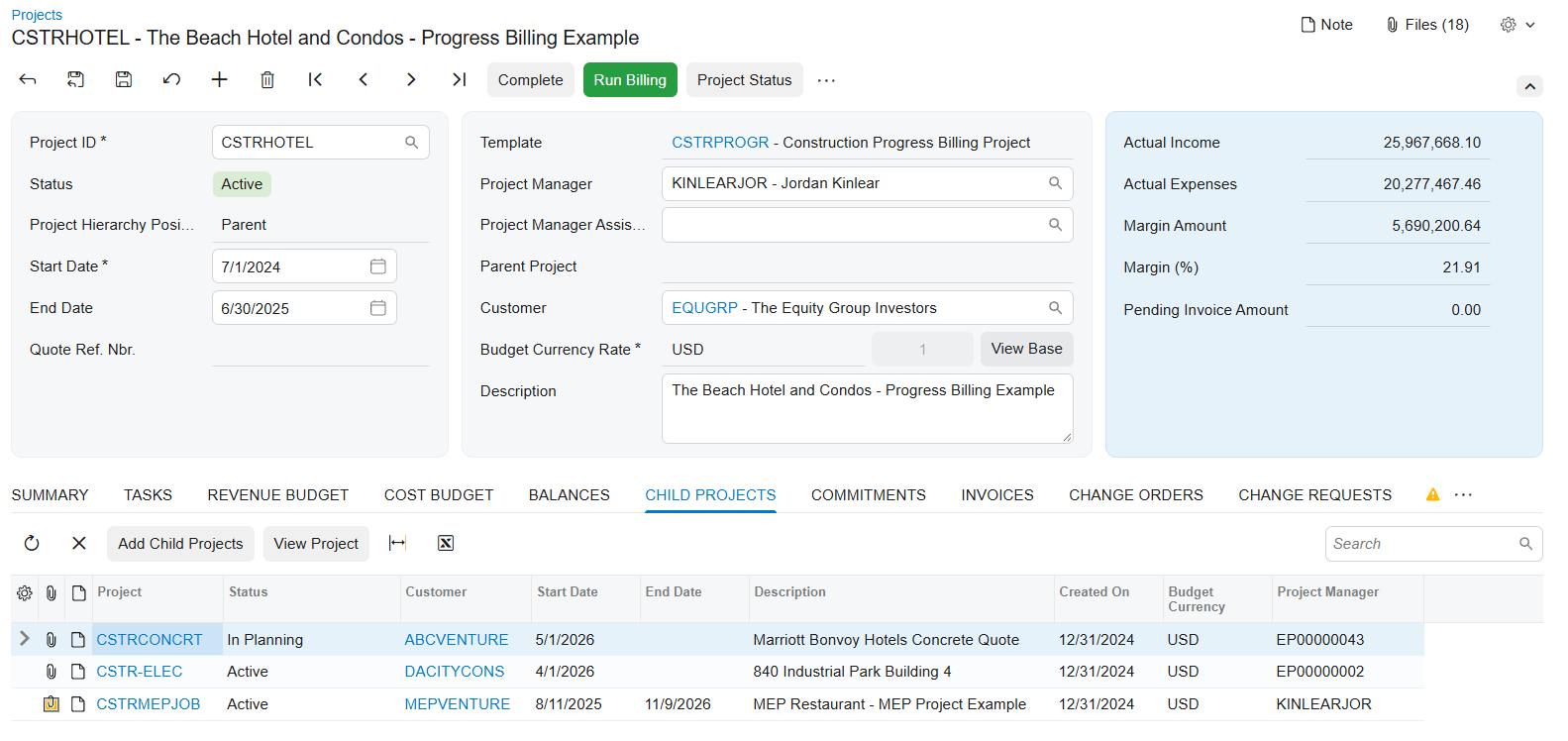
Parent and child projects are new in 2026 R2. Take a client programme that runs in phases, such as discovery, build and rollout. The programme is the parent. Each phase is a child project. Sites, work scopes or cost centres can work the same way.
Each child has its own budget, billing and manager. The project manager gets one consolidated view across the programme.
A rollup rule maps each child’s cost codes and account groups to the parent. Once it’s set, selected transactions roll up without being counted twice.
You choose how billing runs. The parent can bill the customer for the work done in its children. Or each child can bill its own customer, while the parent pulls the data together for reporting.
For the engagement lead, the gain is that each phase has an owner and a budget, and the programme still shows as one.
Time, expenses and branches
Four changes help your finance team keep costs in the right place and make life easier for the people logging time.
Branch alignment for time. Time cards and time activities can record project costs under the project’s branch. Acumatica says they line up with both the project’s branch and the employee’s branch across a multi-branch firm.
Branch alignment for expenses. When an expense belongs to a project in another branch, the cost posts to the project’s branch. The liability stays with the employee’s branch. An administrator chooses whether a branch mismatch is filled in automatically, flagged with a warning or blocked at release.
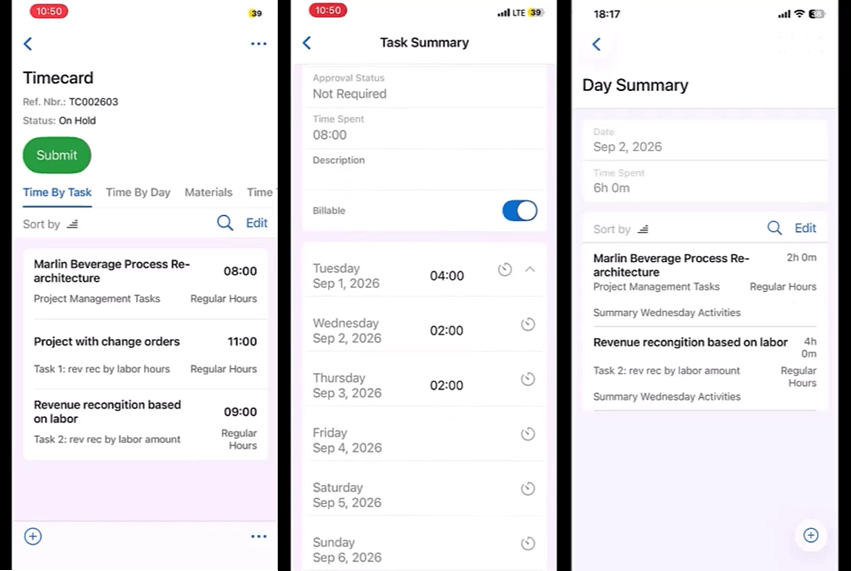
The mobile time card. You can enter time and material for any period, not only the default week. That includes absences dated ahead and weeks someone skipped. The mobile screen shows running totals for each day and each task.
Reclassify Project Transactions. A new form finds eligible transactions and updates their project, task or accounting details. You don’t have to reverse and recreate each entry.
Shared labour and overheads are also said to be spread across branches by allocation rules, with intercompany journals that balance on their own. Reclassifications are said to keep a full audit history.
For the finance team, the gain is fewer manual corrections. For consultants, it’s an easier way to enter time for a week they missed.
Scope changes and change requests
Scope grows during an engagement. 2026 R2 helps you price and track that growth before it reaches the invoice.
Pricing on change requests. Price a change request from unit costs plus markups, or from sales prices and price books.
Commitments attached early. Attach existing purchase orders and subcontracts to a change request. That helps when part of the work is bought in.
Tax before the change order. You see the full tax breakdown before the change order is created.
Billed against pending. Each change order tracks what’s billed and what’s still pending, even when one revenue budget line spans several change orders.
Budget line details. Budget lines created from change orders, change requests or project transactions copy the description, unit of measure and unit rate from their source. Nobody retypes them.
For the engagement lead, the gain is one place to see the cost, tax and billing position of a change.
Billing, revenue and forecasts
Three changes show where an engagement is heading and how much of it you’ve billed.
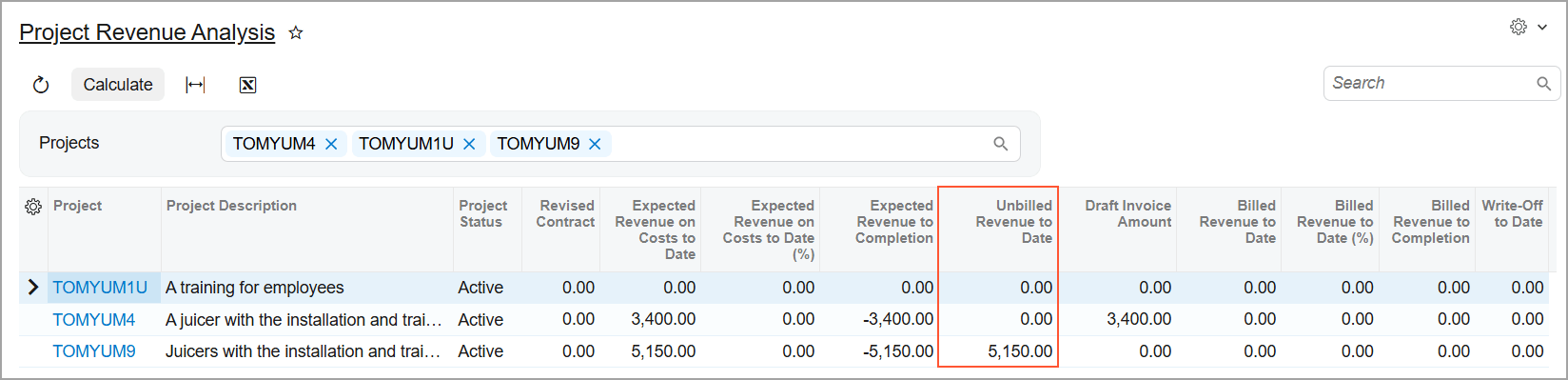
Unbilled ageing and revenue analysis. The Unbilled Project Revenue Ageing and Project Revenue Analysis inquiries now include tasks billed through a Progress Billing step, not only Time and Material. Acumatica says this helps you spot billing opportunities.
Progress worksheets with quantities. You record completed quantities on revenue budget lines. The system recommends a completion percentage, based on the work completed for the customer or on the quantities used. You can review revenue and cost progress side by side.
Monthly cost forecasts. You can spread projected costs across the project timeline using front-loaded, back-loaded, bell or linear S-curve profiles. Baseline, projected and actual costs sit side by side, month by month.
For the finance team and the engagement lead, the gain is a billing and forecast view that rests on recorded figures.
Outside specialists and the Vendor Portal
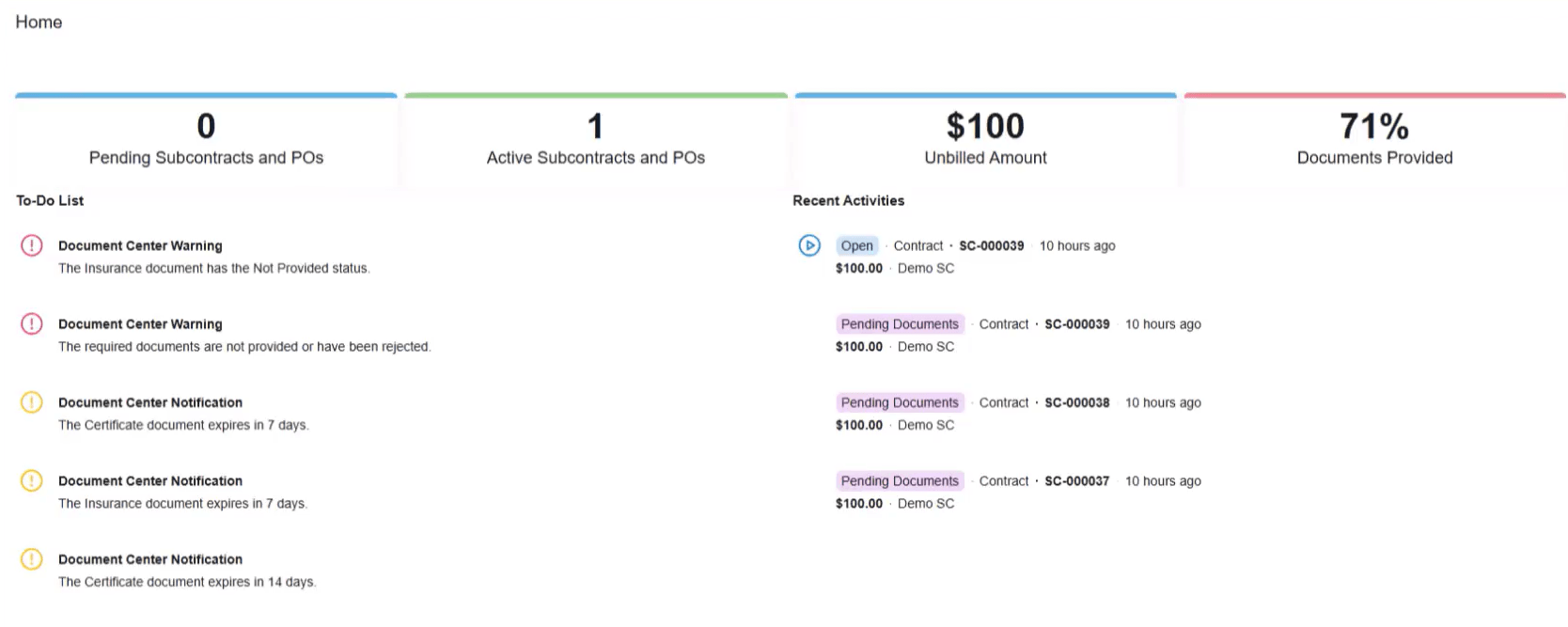
Many services firms buy in specialists or work alongside partner firms. The Vendor Portal is new in 2026 R2. Vendors and subcontractors sign in to see their subcontracts and purchase orders, submit documents and follow the status, without asking your project team. Acumatica calls it the first step towards a wider Construction Exchange.
Acumatica’s own blog describes how the compliance side works. A compliance manager sets a requirement once, and it applies to every matching subcontract. Documents that expire within 30 days are flagged. When a document is verified, the subcontract moves from Pending Documents to Open. The blog says the same logic suits outside specialists, partner firms and contingent contributors.
Insurance certificates, safety certifications and tax documents are said to go through the portal too. An expired or failed document is said to place a hold on the vendor’s payments.
The portal is early. One partner describes it as experimental and available by request in production instances. We come back to that under ‘What to weigh up’.
Utilisation and dashboards
How busy is your team, and how much of that time is billable? Acumatica lists employee utilisation with its 2026 R2 changes for professional services, although its release notes place the Employee Utilisation inquiry in 2026 R1. It shows each employee’s logged, available and billable hours. Utilisation compares billable hours with the hours available in the employee’s work calendar.
The 2026 R2 dashboards show work in process, profitability, committed and forecast costs, and variance against plan. You can filter them to a single project, and they stay current as transactions post. Acumatica says this gives services leaders a view of engagement profitability, resource utilisation and the billing pipeline.
Work in process by percentage of completion, with over-billed and under-billed positions across active projects, is also said to be part of the release. So are margin drift alerts that track the original estimated margin against the revised forecast, and dashboard layouts for executives, project managers, and controllers.
For the practice head, the gain is a view of both people and projects that doesn’t wait for someone to build a report.
Asking your numbers: the AI Assistant
The AI Assistant in 2026 R2 answers harder finance questions. It can analyse document history and answer questions about prior periods and specific dates. Your finance team can see how a balance changed and trace the transactions behind it. Answers can come as text, charts or tables. You can turn one into a dashboard widget, refine it, check the Generic Inquiry behind it and add it to an editable dashboard.
In project work, the assistant is also said to read uploaded insurance PDFs, pull out expiry dates and policy limits, and alert project managers before an outside specialist starts. It is said to compare percentage complete with burn rate, and to flag cost overruns weeks before month end.
The CRM side gets AI too. It highlights opportunities and cases that need attention. In the Activity Stream, you see customer sentiment, a summary of recent communications, suggested next steps and a suggested reply.
The assistant answers from your data, so it’s only as good as that data. Complete time entries and correct project codes matter more once anyone can ask questions about them.

What it means for your engagement leads, finance team and practice heads
Engagement leads. Parent and child projects give each phase a budget and a manager. Change requests show cost, tax and billing position in one place.
Finance team. Branch alignment, the reclassify form and monthly forecasts help you keep cost in the right place. The billing reports now show unbilled work across more billing types.
Practice heads. Utilisation, the dashboards and the AI Assistant help you see how busy people are and how engagements are doing.
What to weigh up
Start small. Try parent and child projects on one new engagement before you restructure existing ones.
Rollup rules need mapping. Each child project’s cost codes and account groups have to map to the parent before costs roll up cleanly.
Choose your branch policy. Decide whether the system fills in the project branch on expenses, warns about a mismatch or blocks the release. Agree it before go-live.
Time entry habits matter. The utilisation figures count only released time activities in the period, and available hours come from each employee’s work calendar. Check both are right.
The Vendor Portal is early. One partner describes it as experimental and available by request. Confirm it’s available for your instance before you plan around it.
Plan for the Classic UI retirement. Classic-only screens still work in 2026 R2 but retire in 2027 R1. If you use Classic forms, dashboards, pivot tables or customisations, plan the move now.
Key takeaways
Big engagements get a proper structure. Parent and child projects give each phase its own budget, billing and manager, and rollup rules keep the parent in step.
Time and expenses follow the project’s branch. Time cards, time activities and expenses can post costs under the project’s branch, and an administrator sets the policy for expenses.
Scope changes are priced and tracked in one place. Change requests carry pricing, commitments and tax, and change orders show billed against pending.
Billing and forecasts cover more of the work. Unbilled aging and revenue analysis include progress-billed tasks, and monthly forecasts compare baseline, projected and actual cost.
Utilisation, dashboards and the AI Assistant show how things stand sooner. You can see hours, margin drivers and prior-period figures without waiting for a report.
Thinking about moving to 2026 R2?
Start with our guide, Upgrading to Acumatica 2026 R2: what you gain and what to check first. It covers what has changed, the Classic UI retirement and what to look at before you move.
Then, if you want to talk it through:
AcuPower customers
Book a Call – UK, Europe & South Africa
Acumatica partners short on capacity
Book a Call – UK, Europe & South Africa
If you use Acumatica through another partner, ask them about upgrading to 2026 R2.
Comments (0)
No comments yet
Be the first to comment


 128